VLAN (Virtual Local Area Network)
A VLAN is a technology used in networking to segment a physical network into multiple logical networks. It allows devices that are part of different VLANs to be on separate, isolated networks, even if they share the same physical network infrastructure, like switches.
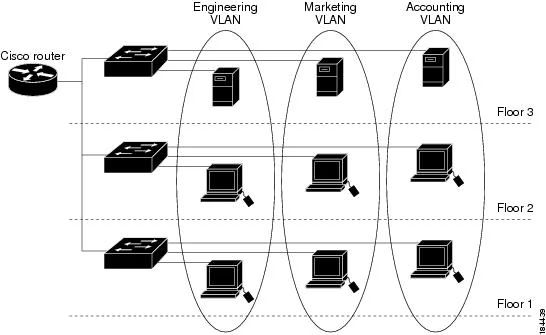
By default, all the ports of switches are in the same VLAN (VLAN 1), meaning that all devices in the local area network can communicate with each other. If a virus spreads within the network, it could affect the entire network. VLANs should be configured to reduce this risk.
The figure above shows three departments (engineering, marketing, and accounting) on different floors. VLAN configuration can group these departments individually by assigning each department to its own VLAN. As a result, devices can only communicate within their respective departments.
Configuration of VLANs
- Create VLAN
- Named VLAN
- Assign interface to VLAN
- Configure trunk mode (between switches)
- Save configuration
- Check configuration
(config)# vlan [id]
(config-vlan)# name [vlan name]
(config)# interface [port]
(config-if)# switchport mode access
(config-if)# switchport access vlan [number]
(config)# interface [port]
(config-if)# switchport mode trunk
(config)# copy running-config startup-config
# show vlan